Understanding renderedCallback hook in LWC
A practical guide to renderedCallback lifecycle hook in LWC — when to use it vs. getters, setters, and connectedCallback() and common pitfalls
If you've spent any time building Lightning Web Components, you've met the lifecycle hooks: constructor, connectedCallback, renderedCallback, disconnectedCallback, and errorCallback. Of these, renderedCallback() is probably the most misunderstood — and the easiest to misuse. I remember back in 2019, when LWC was pretty new, i used to do lot of things wrong which also helped me understand the concepts better. RenderedCallback hook was one of those mistakes for me.
In this article, i will try to break down what renderedCallback() actually does, how to decide when to reach for it versus a getter, setter, or connectedCallback(), the traps that catch most developers, and a handful of practical use cases with code you can drop into your own components.
What is renderedCallback()?
renderedCallback() is one of the lifecycle hooks in LWC that fires after every render of the component. That's the key word: every. Unlike connectedCallback(), which runs once when the component is inserted into the DOM, renderedCallback() runs each time the component re-renders — and a component re-renders whenever a reactive property it depends on changes.
It's the LWC equivalent of "the DOM is now painted and ready." This makes it the right place to do work that depends on the rendered DOM existing, and the wrong place to do work that should only happen once.
Let's revisit the lifecycle order for a parent and child component in LWC:
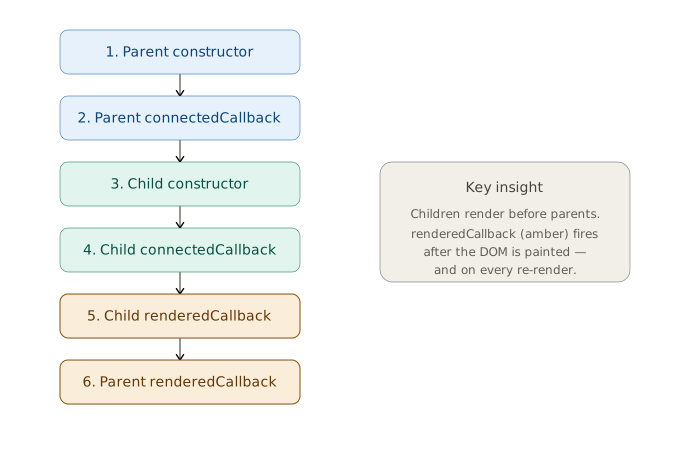
Children render before parents — useful to remember when you're coordinating DOM work across a hierarchy.
Now, before jumping into the examples, let's understand the difference between DOM insertion and rendering.
DOM insertion vs. rendering: two different moments
A lot of renderedCallback() confusion comes from blurring two events that feel simultaneous but aren't: a component being inserted into the DOM and a component being rendered. They happen in that order, they're triggered by different things, and two different lifecycle hooks fire for them.
Insertion is when the component element is connected to the document tree. The browser now knows that your <c-my-component> exists and where it sits in the page hierarchy. This is what fires connectedCallback(). Crucially, at this point the component's own internal markup — the elements declared in its template — has not been built yet. The host element is in the DOM, but its shadow tree is empty. So, If we try to do this.template.querySelector(...) here, we'll typically get null.
Rendering is the step that follows: LWC takes your template plus the component's current reactive data and produces the actual child elements, then writes them into the component's shadow DOM. Once that finishes, the elements exist and are measurable. This is what fires renderedCallback().
A useful analogy: insertion is signing the lease on an empty apartment — you have the address and the keys, but there's no furniture. Rendering is moving the furniture in. connectedCallback() runs the moment you get the keys; renderedCallback() runs after each time the place is furnished (or rearranged).
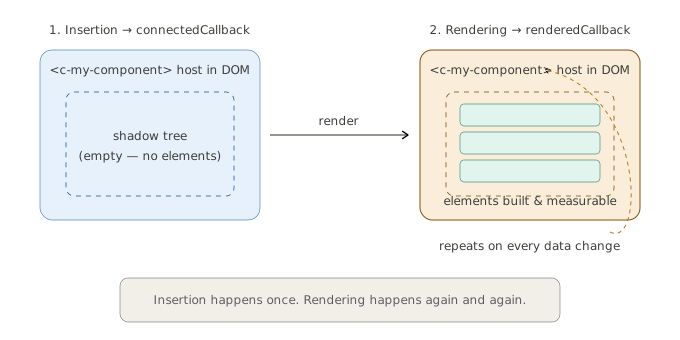
The two also differ in how often they happen, and this is the practical punchline:
| DOM insertion | Rendering | |
|---|---|---|
| Hook | connectedCallback() | renderedCallback() |
| Fires | Once, when the element is added | Every time the component renders |
| Internal DOM available? | No — template not built yet | Yes — elements exist |
| Repeats on data change? | No | Yes |
| Good for | Setup, data fetch, subscriptions | Measuring, focusing, DOM-dependent work |
So insertion is a one-time "I now have a place in the page" event, while rendering is a recurring "my visible output was just (re)built" event. A single insertion is followed by one initial render, and then potentially many more renders as reactive properties change — each of those later renders fires renderedCallback() again without any new insertion happening. That asymmetry is the root of both the right uses and the classic mistakes covered below.
When should you actually use it?
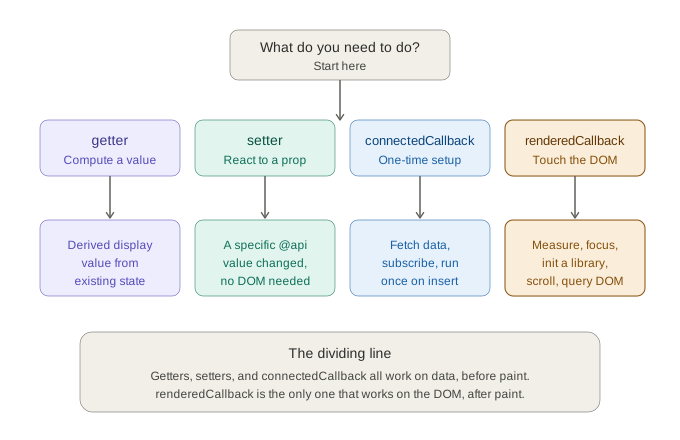
Before writing any renderedCallback() code, the most useful thing We can learn is when not to use it. LWC gives you several reactivity mechanisms, and renderedCallback() is the one you should reach for least often. The diagram below maps the decision; the two comparisons that follow explain each branch.
renderedCallback() vs connectedCallback()
A quick decision guide:
| Need | Use |
|---|---|
| Run setup once when component is added | connectedCallback() |
| Fetch data on load | connectedCallback() (or wire) |
| Subscribe to events / messaging channel | connectedCallback() |
| Manipulate or measure rendered DOM | renderedCallback() |
| Initialize a library that needs a DOM node | renderedCallback() |
| React to DOM after a reactive change | renderedCallback() |
If your logic doesn't depend on the DOM being painted, it probably belongs in connectedCallback() instead.
renderedCallback() vs getters and setters
The other comparison worth internalizing early is between renderedCallback() and reactive getters/setters. They solve overlapping problems, and reaching for the lifecycle hook when a getter or setter would do is a common source of over-complicated components.
Getters: for derived values, not DOM work
A getter computes a value from existing reactive state. Because LWC re-invokes a getter whenever the properties it reads change, it's the natural home for derived data — formatting, filtering, conditional CSS classes, computed totals. Developers sometimes compute these in renderedCallback() and stash them on a property, which is both slower and loop-prone.
// ❌ Computing derived state in renderedCallback
renderedCallback() {
    this.fullName = `${this.firstName} ${this.lastName}`; // reactive write → re-render risk
}

// ✅ A getter — lazy, cached per render, no loop
get fullName() {
    return `${this.firstName} ${this.lastName}`;
}
The getter version has no flag, no re-render risk, and the template just references {fullName}. Rule of thumb: if you're assigning to a reactive property inside renderedCallback() to display it, you almost certainly want a getter.
Setters: for reacting to incoming property changes
A setter on an @api property fires the moment a parent passes a new value — before render. This is the right place to react to data changes that don't need the DOM, and it's far more precise than renderedCallback(), which can't easily tell you which property changed or distinguish a data change from any other re-render.
// ✅ React to a specific incoming value with a setter
@api
get recordId() {
    return this._recordId;
}
set recordId(value) {
    this._recordId = value;
    this.loadRecord(value); // runs only when recordId actually changes
}
Contrast that with trying to detect the same change in renderedCallback(), where you'd have to cache the previous value and compare on every single render — exactly the manual bookkeeping the setter does for you automatically.
The dividing line
| If you need to... | Use |
|---|---|
| Compute a value to display from existing state | getter |
| React to a specific property changing (no DOM needed) | setter |
| Do work that requires the rendered DOM to exist | renderedCallback() |
| Run one-time setup on insertion | connectedCallback() |
A clean way to remember it: getters and setters operate on data, before paint; renderedCallback() operates on the DOM, after paint. When your instinct says "do this in renderedCallback()," pause and ask whether the work actually touches the rendered DOM. If it doesn't, a getter or setter is almost always the simpler, safer choice.
The number one trap: infinite re-render loops
Once you've decided renderedCallback() genuinely is the right hook, the first thing to internalize is its single biggest hazard. Because renderedCallback() runs on every render, mutating a reactive property inside it can trigger another render, which calls renderedCallback() again, which mutates the property again... and your component locks up.
// ❌ DON'T DO THIS
renderedCallback() {
    this.count = this.count + 1; // reactive change → re-render → loop
}
The fix is almost always a guard flag so the logic runs only when you intend it to:
// ✅ Guard with a private flag
export default class MyComponent extends LightningElement {
    _hasRendered = false;

    renderedCallback() {
        if (this._hasRendered) {
            return;
        }
        this._hasRendered = true;
        // one-time post-render setup here
    }
}
Use case: an editable Contact modal form
Let's understand every pattern in one component you might actually ship: an Edit Contact modal. It opens over the page, lets the user edit a few fields, validates on submit, and closes. This one component happens to need renderedCallback() in four genuinely different ways, and seeing them in a single context makes it clear why each one belongs there and not in another hook.
Here's the shape of the component we're building up. The examples that follow are each a real slice of it.
import { LightningElement, api } from 'lwc';
import { loadScript } from 'lightning/platformResourceLoader';
import INPUTMASK from '@salesforce/resourceUrl/inputmask';

export default class EditContactModal extends LightningElement {
    @api isOpen = false;
    @api contact = {};

    _focused = false;
    _maskInitialized = false;
    _bodyOverflowing = false;
    _submitAttempted = false;

    renderedCallback() {
        this.focusFirstFieldOnOpen();
        this.initPhoneMask();
        this.syncScrollShadow();
        this.scrollToFirstError();
    }
}
Notice the single renderedCallback() delegates to four small, self-contained methods. That's a good habit on its own: it keeps the hook readable and lets each concern manage its own guard.
Example 1: Focus the first field when the modal opens
When the modal appears, the cursor should land in the first field. You can't query that field until it's rendered, so connectedCallback() is too early — the input doesn't exist yet. renderedCallback() is right on time.
focusFirstFieldOnOpen() {
    if (this.isOpen && !this._focused) {
        const input = this.template.querySelector('lightning-input');
        if (input) {
            input.focus();
            this._focused = true;
        }
    }
    // reset when the modal closes so it focuses again next time it opens
    if (!this.isOpen) {
        this._focused = false;
    }
}
The _focused flag keeps this from re-grabbing focus on every render while the modal stays open — which would fight the user as they tab between fields.
Example 2: Initialize a third-party input-mask library
Say you want the phone field formatted as the user types, using an external library loaded as a static resource. The library needs a real DOM node to attach to, and renderedCallback() guarantees that node exists. Pair it with loadScript from lightning/platformResourceLoader.
initPhoneMask() {
    if (this._maskInitialized || !this.isOpen) {
        return;
    }
    this._maskInitialized = true;

    loadScript(this, INPUTMASK)
        .then(() => {
            const phone = this.template.querySelector('[data-id="phone"]');
            window.Inputmask({ mask: '(999) 999-9999' }).mask(phone);
        })
        .catch((error) => {
            this._maskInitialized = false; // allow a retry on the next render
            console.error('Input mask failed to load', error);
        });
}
The guard matters doubly here — without it you'd reload the script and re-apply the mask on every single render. Note also that the flag is reset in the catch, so a transient load failure doesn't permanently disable the mask.
Example 3: Measure the body to toggle a scroll shadow
A nice UI touch: show a subtle shadow under the modal header only when the body content is tall enough to scroll. Layout measurements like scrollHeight and clientHeight only return meaningful numbers once the element is rendered, so this reads them in renderedCallback().
syncScrollShadow() {
    const body = this.template.querySelector('.modal-body');
    if (body) {
        const overflowing = body.scrollHeight > body.clientHeight;
        // only assign when it actually changed — avoids a needless re-render
        if (overflowing !== this._bodyOverflowing) {
            this._bodyOverflowing = overflowing;
        }
    }
}

get bodyClass() {
    return this._bodyOverflowing ? 'modal-body has-shadow' : 'modal-body';
}
Note the comparison before assignment. Blindly writing a reactive property every render is exactly how the infinite loop from earlier sneaks back in. The derived class name lives in a getter, not in renderedCallback() — measuring is DOM work, but computing the class string is plain data.
Example 4: Scroll to the first validation error on submit
When the user submits an invalid form, jump the view to the first field with an error. The error elements only exist after the re-render that follows a failed submit, so this is a textbook renderedCallback() job — you can't scroll to something that isn't on the page yet.
scrollToFirstError() {
    if (!this._submitAttempted) {
        return;
    }
    const firstError = this.template.querySelector('.has-error');
    if (firstError) {
        firstError.scrollIntoView({ behavior: 'smooth', block: 'center' });
    }
    this._submitAttempted = false; // consume the flag so it runs once per submit
}

handleSubmit() {
    this._submitAttempted = true; // triggers a render; the scroll happens after
}
Here the guard is consumed rather than permanent: handleSubmit() raises the flag, the resulting render fires renderedCallback(), the scroll runs, and the flag is lowered again. Each submit attempt produces exactly one scroll. This is the key difference from Example 1's boolean (which blocks repeats) and resembles the "run again only when something new happened" idea — here the "something new" is a fresh submit.
What the four examples have in common
Same component, same single renderedCallback(), four different guard strategies:
| Example | What it does | Guard style |
|---|---|---|
| 1. Focus first field | Put cursor in field on open | Boolean, reset on close |
| 2. Init input mask | Attach a JS library to a node | One-time boolean, reset on error |
| 3. Scroll shadow | Measure overflow, toggle a class | Compare-before-assign |
| 4. Scroll to error | Jump to first invalid field | Flag consumed per submit |
Every one of them needs the rendered DOM to exist, and every one is guarded so it doesn't run wastefully on unrelated re-renders. That combination — needs the DOM plus guarded against repeats — is the signature of a legitimate renderedCallback().
A word on idempotency
Most of the bugs people hit with renderedCallback() come down to one idea: the method is not guaranteed to run a fixed number of times, so the safest code is code that produces the same result no matter how many times it runs. That property is idempotency, and it's worth designing for deliberately rather than patching guards on after the fact.
Think of it as a spectrum. At one end, an operation is naturally idempotent — setting element.scrollTop to a computed value, or assigning a CSS class — running it twice changes nothing the second time. At the other end, an operation accumulates state — incrementing a counter, appending a DOM node, pushing to an array, attaching an event listener. Those are the ones that bite you, because each extra render compounds the effect.
The guard flags throughout this post are really just a way of forcing idempotency onto operations that don't have it for free. The _maskInitialized boolean turns "attach the input mask" (not idempotent) into "attach it at most once" (effectively idempotent). The compare-before-assign in the scroll-shadow example turns "write the property every render" into "write only on genuinely new state."
A few practical ways to keep renderedCallback() idempotent:
- Prefer assignments over mutations. Setting a value to what it should be is repeatable; appending or incrementing is not.
el.textContent = labelsurvives repeated calls;el.appendChild(node)does not. - Check before you act. Read the current DOM or property state and only write when it differs from the target. This both prevents accumulation and avoids triggering needless reactive re-renders.
- Make listeners self-deduplicating. If you must add an event listener here, either guard it with a flag or remove-then-add so you never stack duplicates. Stacked listeners are a silent, hard-to-trace source of double-firing handlers.
- Treat the flag as the exception, not the rule. If you find yourself adding three or four guard flags to one
renderedCallback(), that's a signal the logic might belong in a more appropriate hook, a@wire, or a getter instead.
Closing thoughts
renderedCallback() is a precision tool. Used well, it handles all the "after the DOM exists" work that no other hook can. Used carelessly, it's the fastest way to freeze a component. The mental model to keep: this runs after every render, so make every line either idempotent or guarded.